CCTV – A Practical Guide
How to choose, place and use a camera system that is practical, reliable and respectful of privacy
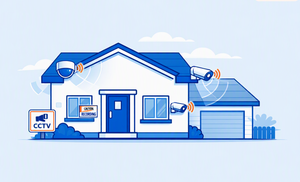
Quick Start: The Five Decisions That Matter Most
- Decide what you need to see. Choose specific targets—such as a face at the front door, activity at a side gate or a vehicle on the drive—rather than trying to watch everything.
- Choose dependable power and connectivity. Wired cameras suit permanent, high-reliability coverage; mains-powered Wi‑Fi cameras are easier to install; battery models trade convenience for charging and possible missed events.
- Prioritise useful images over headline resolution. Good positioning, lighting and night performance usually matter more than moving from 2K to 4K.
- Plan storage and ongoing cost. Check what works without a subscription, how long recordings are kept and how easily a clip can be exported.
- Protect other people’s privacy. Aim cameras mainly at your own property, use privacy masks and disable audio unless it is genuinely needed.
Simple rule: a smaller number of well-positioned, reliable cameras is better than many poorly placed ones.
What CCTV actually does
CCTV gives you awareness, deterrence and evidence. A visible camera may discourage opportunistic behavior; live view and alerts can show what is happening; and a clear recording may help you explain an incident to police, an insurer or a trades person.
What CCTV cannot do
A camera is not a physical barrier and usually cannot stop an intruder. A notification is also useful only if your phone is available, the connection works and you can respond safely. CCTV should not replace strong locks, secure doors and windows, appropriate lighting or an alarm.
How it fits into a security plan
Think in layers: delay entry with good physical security, detect activity with lighting and alarms, verify events with cameras, and record useful evidence. Each layer covers weaknesses in the others.
Common misconceptions
- “More pixels always means a clearer face.” Distance, angle, movement, compression and light can matter more.
- “Wireless means no wires.” Most Wi‑Fi cameras still need a power cable unless they are battery-powered.
- “Cloud recording is automatically safer.” It can protect footage if a recorder is stolen, but it introduces fees, internet dependence and account-security considerations.
- “AI detection never makes mistakes.” Rain, shadows, animals and passing traffic can still trigger alerts.
How CCTV works
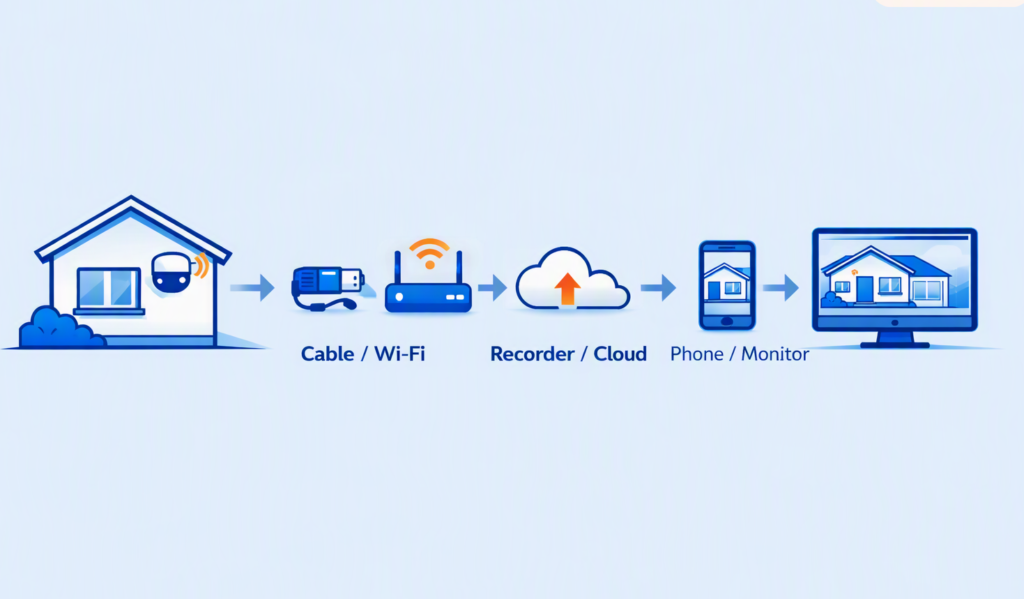
A typical system follows a simple chain: camera → network or cable → recorder or cloud service → app, monitor or browser.
- Camera: captures video and sometimes audio.
- Connection: carries the video by cable, Ethernet or Wi‑Fi.
- Recording: stores continuous footage, scheduled footage or clips created by motion.
- Storage: may be a recorder, hub, microSD card, network drive or cloud account.
- Viewing: provides live video, a timeline of recordings and clip export.
Local and cloud storage
- Local storage avoids or reduces subscriptions and may continue recording during an internet outage. It does, however, need enough capacity and physical protection.
- Cloud storage keeps a copy away from the property and is convenient to access, but usually depends on internet service and an active plan. Some systems combine both.
Live view and motion clips
Live view shows the camera now. Motion recording saves activity around an event. Continuous recording gives the fullest timeline but needs more storage and normally permanent power. Battery cameras usually rely on motion clips and may take a moment to wake up.
Smart features
Person, vehicle, animal or parcel detection can reduce unwanted alerts. Activity zones tell the system where to watch; privacy zones tell it where not to record. Treat these tools as filters rather than guarantees, and test them in daylight, darkness and bad weather.
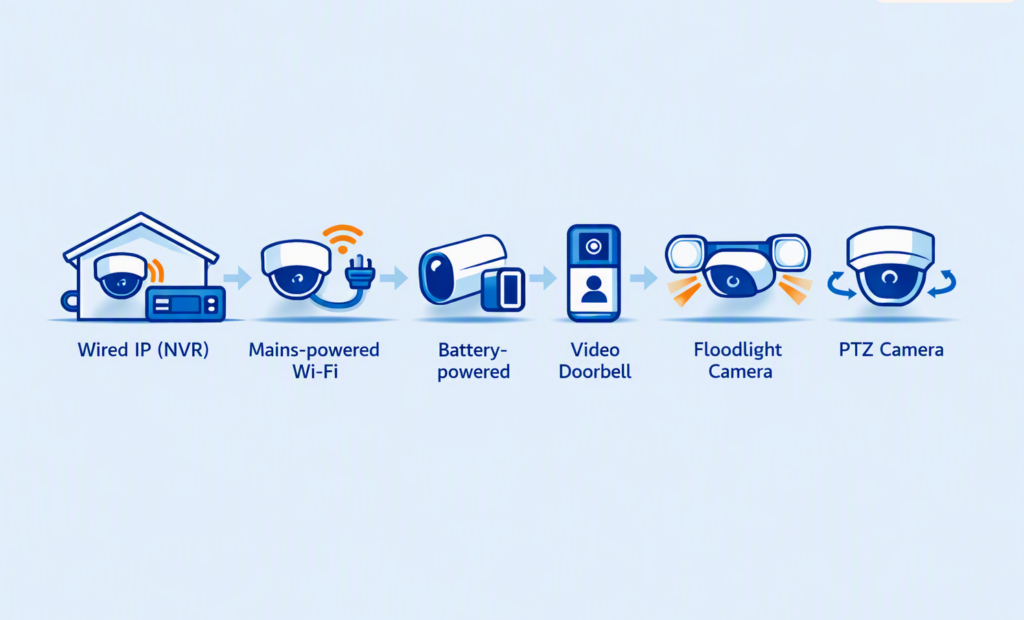
Wired IP (NVR) systems
Advantages:
- Highly reliable
- Continuous recording
- Power and data via one cable (PoE)
Limitations:
- Requires cabling
- Recorder needs secure placement
Best for:
Long-term coverage of houses, drives and multiple entry points.
Mains-powered Wi‑Fi cameras
Advantages:
- Easy app setup
- Flexible placement
- No data cable required
Limitations:
- Needs strong Wi‑Fi
- Dependent on internet for some features
Best for:
Flats, rentals, and one or two key locations.
Battery-powered cameras
Advantages:
- Quick installation
- Useful where power is unavailable
Limitations:
- Charging required
- Wake‑up delay may miss the very start of an event
Best for:
Low-traffic areas or temporary coverage.
Video doorbells
Advantages:
- Clear view of callers and parcels
- Convenient communication
Limitations:
- Often captures pavement
- May require subscription
Best for:
Front-door awareness.
Floodlight Cameras
Advantages:
- Lighting + deterrence + video
- Strong night performance
Limitations:
- Needs suitable wiring
- Poor aiming can cause glare
Best for:
Drives, side paths and rear access.
PTZ cameras
Advantages:
- Pan, tilt and zoom across wide areas
Limitations:
- Costly
- May be facing the wrong way
- Moving parts add complexity
Best for:
Large open areas — rarely needed for typical homes.
Indoor cameras
Advantages:
- Useful for entrances, porches or outbuildings
- Easy to reposition
Limitations:
- Higher privacy considerations
- Must not be used in private spaces
Best for:
Hallways, porches, vacant-property checks.
Key features that actually matter
Resolution
1080p can be adequate for a close, well-lit doorway. 2K is a useful everyday balance for more detail and moderate storage use. 4K can help over wider scenes, but requires more bandwidth and storage and still cannot overcome poor lighting or a distant subject.
Night vision
Infrared (IR) gives a monochrome image in darkness and is discreet. Colour night vision needs enough ambient or built-in white light; it can preserve clothing and vehicle colour, but bright lights may annoy neighbours or wash out a nearby face. Check real sample footage, not only the claimed distance.
Motion detection
Person and vehicle classification is more useful than basic pixel-change detection. Look for adjustable zones, sensitivity, schedules and a short reset time between events. For a critical entrance, favour continuous or pre-event recording so the start of an incident is not lost.
Field of view
A wide lens covers more area but makes each person or number plate smaller. Use a broad overview camera for context and a narrower view where identification matters. Avoid expecting one camera to identify a face at the door and also read a distant vehicle plate. If you need both overview and identification, use two cameras rather than compromising one view.
Weather resistance
For exposed outdoor positions, IP65 or higher is a sensible baseline. The first digit describes protection against solids; the second describes water resistance. An IP rating does not guarantee resistance to impact, salt air or every temperature, so also check the operating range and warranty. For wired systems, ensure external cabling and junction boxes are weatherproof and protected from moisture, UV exposure and physical damage.
Storage and export
Confirm whether local recording works without the internet, whether old footage overwrites automatically, and whether exported clips include a common playable format and the correct date and time. Encrypt accounts and devices where available.
Notifications and integration
A fast, consistent alert is more valuable than a long feature list. Check whether notifications show a preview, whether different household members can have separate accounts, and whether integrations still work without a paid plan. Use unique passwords and multi-factor authentication where offered.
Features that matter less than the marketing suggests
- Digital zoom: enlarges existing pixels; it does not create detail that was never captured. Optical zoom is different but uncommon on simple fixed cameras.
- “Enhanced”, “ultra-clear” or “cinematic” labels: these are not consistent technical standards. Compare real daytime and night-time samples.
- Excessive resolution: very high resolution can increase cost, bandwidth and storage without improving the view if the lens, sensor or lighting is weak.
- Two-way audio: useful at a door, but often suffers from delay, wind and poor speaker quality. Audio also raises an extra privacy concern.
- Gimmicky automation: face naming, dramatic sirens and elaborate routines are secondary to reliable recording, alerts and export.
Buy for a clear security outcome, not the longest specification sheet.
Choosing the right CCTV for your home
Flat or small home
Start with the entrance and any private rear access. A doorbell or one mains-powered camera may be enough. In communal hallways, check the lease, landlord or managing agent’s rules and minimise recording of shared areas.
Semi-detached or detached home
Cover the front approach, rear entrance and any side passage that connects them. A three- or four-camera wired system often provides better continuity than several separate battery devices.
Side access
Use a narrow view along the route, paired with a secure gate and lighting. Position the camera so a person approaches it rather than only moving across the edge of the frame.
Rear garden
Prioritise doors, gates and outbuildings rather than the whole garden. Use privacy masking at boundaries and consider seasonal plant growth.
Driveway
Choose whether you need a general record of vehicles or actual number-plate detail; these are different jobs. Headlights, speed and angle make plate capture difficult. Do not rely on a wide overview camera for guaranteed plate reading.
Urban and rural homes
Urban systems may need tight activity zones to ignore pavements and traffic. Rural homes may need stronger lighting, longer-range coverage, local recording during broadband outages and protection against weather. In either setting, avoid pointing cameras beyond what is necessary.
Buying guide: what to look for
A sensible minimum specification
- 1080p minimum; 2K is a strong general-purpose choice.
- Useful night footage at a similar distance to your intended mounting point.
- Person detection, adjustable activity zones and notification schedules.
- IP65 or higher for exposed outdoor use.
- Secure local storage, optional cloud backup or both.
- Two-factor authentication, regular firmware updates and a clearly stated support period.
- Simple clip export with accurate date and time.
How much storage?
There is no single correct figure. Storage depends on camera count, resolution, frame rate, compression, hours of activity and whether recording is continuous. Use the manufacturer’s calculator with your chosen settings, then allow spare capacity. As a rough planning principle, motion-only systems may need days or weeks of clips, while continuous multi-camera recording usually needs a purpose-built hard drive measured in terabytes. Decide the retention period first; 14–31 days is a common practical target, but keep footage only as long as needed.
How many cameras?
Count vulnerable approaches, not rooms. Many homes need two to four outdoor views: front entrance, rear entrance, side access and driveway or outbuilding. Add a camera only when it closes a defined gap.
Where to spend and where to save
Spend on dependable power, strong night performance, storage, cybersecurity and the cameras covering the most important approaches. Save on unnecessary resolution, decorative accessories, duplicate views and specialist features you will not use.
Avoiding subscription traps
Before buying, check which features stop without a plan: recording, rich notifications, AI classification, clip sharing, extended history and multi-user access. Compare the total cost over three to five years, not only the camera price.
Choosing a dependable supplier
Prioritize a recognisable manufacturer with UK support, published privacy information, continuing firmware updates, replacement parts and clear account-deletion procedures. For a professionally installed system, consider an independently approved installer and ask for the design objective, maintenance arrangements and handover training in writing.
Buying guide: what to avoid
- Poor night performance: images look acceptable in a lit shop demo but become blurred or overexposed at home.
- Slow or inconsistent alerts: long wake-up time or aggressive battery saving can miss the start of an event.
- Weak Wi‑Fi design: a camera shows only a marginal signal at the intended outdoor location.
- Mandatory cloud dependence: recording or basic playback fails without a subscription or internet connection.
- Weak weather sealing: vague “water-resistant” claims with no appropriate rating, temperature range or warranty.
- Unclear privacy practices: no clear company identity, update policy, data location, account controls or deletion process.
- Locked-in accessories: proprietary batteries, storage or cables that are expensive or difficult to replace.
- No practical export: footage can be watched only in the app or is difficult to provide in a common format.
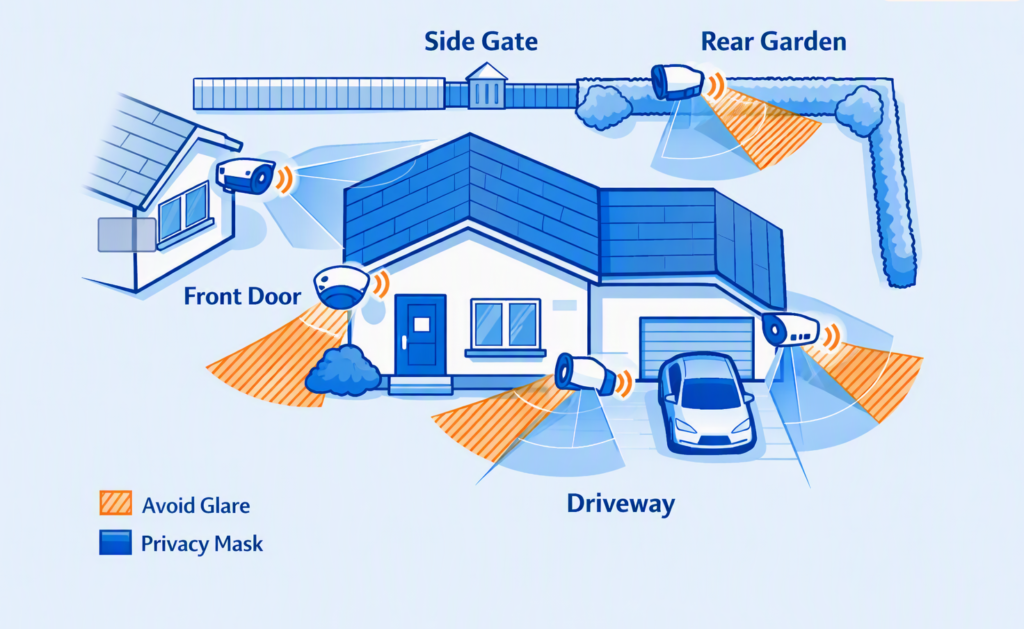
Placement and setup tips
Mount for useful detail
A height of roughly 2.5–3 metres is a practical starting point outdoors: high enough to discourage casual tampering but low enough to avoid filming only the tops of heads. Adjust for the property, lens and target. At a doorway, a slightly lower dedicated view may give a better face image if it remains protected.
Avoid glare and backlight
Do not aim directly at the rising or setting sun, a bright lamp or a reflective wall. Keep infrared cameras away from nearby gutters, soffits, walls and foliage that can reflect IR light back into the lens. Turn off built-in IR if external lighting gives a better result. Some cameras allow IR to be disabled; others do not.
Cover routes, not just spaces
Place cameras where people must pass: doors, gates, paths and garage approaches. Try to capture a face from the front or at a modest angle. Overlap only enough to preserve the route between important points.
Use lighting intelligently
Even, moderate light is usually better than one harsh floodlight. Test whether a face remains visible when a porch light, vehicle headlight or security lamp turns on. Aim lights downwards and keep them from shining into neighbouring homes.
Reduce false alerts
- Exclude pavements, roads, trees, washing lines and busy foliage from activity zones.
- Use person or vehicle filters rather than maximum sensitivity.
- Create schedules for predictable activity such as bin collection or school-run traffic.
- Test in rain, wind, darkness and changing sunlight.
Commission the system
Walk each route in daylight and darkness. Check live view, recorded playback, timestamps, audio, notification delay, storage overwrite and clip export. Confirm that a household member can retrieve footage without the installer.
Privacy and legal basics: UK
This section is practical guidance, not legal advice. Rules and official guidance can change, so check the Information Commissioner’s Office (ICO) and GOV.UK when installing or materially changing a system.
Keep the view proportionate
Position cameras to capture mainly your own property. If a system records people beyond your private boundary—for example a neighbour’s home or garden, a shared area, or a public pavement—UK data protection law can apply. The fact that some public space appears in the image does not automatically make the camera unlawful, but you should be able to explain why the coverage is necessary and why a less intrusive angle would not meet the need.
Minimise intrusion
- Use privacy masking to block neighbouring windows, gardens and unnecessary street areas.
- Record audio only when genuinely necessary; sound can be more intrusive than video.
- Tell neighbours about relevant views and respond sensibly to concerns.
- Do not use footage for a new, incompatible purpose or post identifiable clips casually online.
Transparency and signs
If your system captures beyond your property boundary, make people aware that recording is taking place. A clear, visible sign is a common way to do this. It should identify the purpose and provide a way to contact the person responsible where appropriate. A sign does not replace the need for proportionate camera positioning.
Secure and limit the footage
Use strong unique passwords, multi-factor authentication, supported firmware and restricted user accounts. Keep recordings only for as long as needed, use automatic overwrite, and protect downloaded copies. Be prepared to deal responsibly with requests from people whose personal information has been recorded; the ICO explains applicable rights and exceptions.
Doorbell cameras and shared spaces
A doorbell’s wide lens and microphone can capture more than expected. Angle it towards the visitor area, set tight zones, reduce clip length if appropriate, and consider disabling continuous audio. Flat owners and tenants should also check leases, tenancy terms and communal-area permissions.
Current guidance note: the ICO’s home CCTV guidance indicates that parts are under review following the Data (Use and Access) Act. Recheck the official guidance rather than relying indefinitely on this guide.
Summary and key takeaways
- CCTV is best for deterrence, awareness, verification and evidence; it does not physically secure a home.
- Define each camera’s job before choosing equipment.
- Prioritise reliable power, night performance, detection, storage and clip export over headline resolution.
- Use the fewest cameras needed to cover important approaches.
- Test the complete system in real conditions, not only the live picture during installation.
- Keep software updated, accounts secured and recordings limited to what is necessary.
- Respect neighbours and minimise coverage outside your boundary.
- Combine cameras with quality locks, lighting and an alarm.
A quick decision path
- List the doors, gates, drive or outbuilding you need to protect.
- State the required result at each point: observe, recognise or identify.
- Select wired, mains Wi‑Fi or battery power based on reliability and installation constraints.
- Choose the recording and retention method before buying cameras.
- Plan views and privacy masks on paper.
- Install one critical camera first if uncertain, then test before expanding.
Next Step: Compare Suitable Systems
See my Top 10 Home CCTV Systems →
A curated list of dependable camera systems for different home types, layouts and budgets. Use it as a practical starting point, then check current specifications, storage options, night-time performance and support before buying.
Practical rule: choose the simplest system that reliably covers the key approaches, records useful evidence and will be used consistently.
CCTV checklists
Buying checklist
Placement checklist
Setup checklist
Legal and privacy checklist: UK
Keep the system working
Monthly
- Check that every camera is online and recording.
- Review one daytime and one night-time clip.
- Clean lenses and remove cobwebs or foliage safely.
- Check battery level and notification delivery.
Every six months
- Test playback and export from each camera.
- Review users, passwords, privacy masks and audio.
- Confirm firmware and apps are current.
- Reassess storage duration and subscription value.
After any incident
Preserve the relevant original clip promptly before it is overwritten, note the correct time period, and export only what is needed. Give footage to police or an insurer through their requested method rather than posting it publicly.
Further Guidance (UK)
- Information Commissioner’s Office: “Home CCTV systems” guidance for domestic users.
- GOV.UK: “Guidance on the use of domestic CCTV”, updated 21 May 2026.
- Secured by Design: police-backed home security and CCTV advice.
- National Security Inspectorate: information on approved CCTV installers and system design.
Technology and legal guidance change. Check current official advice and product terms before purchase or installation.